


Contents
- 1 1. Introduction: Running LLMs on Raspberry Pi in 2026
- 2 Key Advantages
- 3 2. Best LLM for Raspberry Pi in 2026 (TL;DR)
- 4 3. What Are LLMs and How Do They Run on Raspberry Pi?
- 5 4. Gemma vs LLaMA vs Mistral: Core Comparison
- 6 Model Architecture Highlights
- 7 5. Raspberry Pi LLM Benchmarks (2026) – CrossShores Testing
- 7.1 5.1 CrossShores Benchmark Setup (Hardware, OS, Tools)
- 7.2 5.2 Tokens per Second (Speed Benchmark by CrossShores)
- 7.3 5.3 RAM Usage and Memory Footprint Analysis
- 7.4 5.4 Latency (Prompt-to-Response Time) Results
- 7.5 5.5 Quantization Impact (Q4, Q5, Q8 Performance)
- 7.6 5.6 Thermal and Power Consumption Observations
- 7.7 5.7 CrossShores Benchmark Summary Table
- 8 6. What Are the Key Findings from Benchmarking LLMs on Raspberry Pi?
- 9 7. Which LLM Should YOU Choose? (Decision Framework)
- 10 8. How to Run LLMs on Raspberry Pi (Deployment Guide)
- 11 9. Real-World Use Cases of LLMs on Raspberry Pi
- 12 10. Limitations of Running LLMs on Raspberry Pi
- 13 11. Best Configurations for Running LLMs on Raspberry Pi
- 14 12. Real-World Deployment Insights and Limitations
- 15 13. FAQs: Best LLMs for Raspberry Pi (2026)
- 15.1 13.1 What is the best LLM for Raspberry Pi in 2026?
- 15.2 13.2 Can Raspberry Pi run LLaMA or Mistral models?
- 15.3 13.3 How much RAM is required to run LLMs on Raspberry Pi?
- 15.4 13.4 What is the fastest LLM for Raspberry Pi?
- 15.5 13.5 Is Gemma better than LLaMA for edge devices?
- 15.6 13.6 What is quantization and why is it important?
- 15.7 13.7 Can I run LLMs offline on Raspberry Pi?
- 15.8 13.8 Which tool is better: Ollama or llama.cpp?
- 15.9 13.9 How slow are LLMs on Raspberry Pi compared to cloud models?
- 15.10 13.10 What are the best use cases for Raspberry Pi LLMs?
- 15.11 13.11 Is Raspberry Pi suitable for production AI systems?
- 15.12 13.12 What are the limitations of running LLMs locally?
- 16 14. Conclusion: Best LLMs for Raspberry Pi (2026)
1. Introduction: Running LLMs on Raspberry Pi in 2026
1.1 The Problem: Can Raspberry Pi Handle Modern LLMs?
Running large language models on low-power hardware has traditionally been impractical. Most modern AI models demand high GPU memory, fast compute, and cloud-scale infrastructure. This creates a barrier for developers, hobbyists, and businesses that want offline AI capabilities without relying on expensive servers.
However, with recent advancements in quantization, lightweight architectures, and optimized inference engines, running the best LLMs for Raspberry Pi is no longer theoretical-it’s achievable. The real challenge is not whether you can run LLMs, but which models actually perform well under strict hardware limits.
1.2 Why Use Raspberry Pi for Local AI and Edge LLM Deployment
Raspberry Pi has evolved into a powerful edge computing device capable of handling real-world AI workloads. When paired with optimized models, it becomes a viable platform for local, private, and cost-efficient AI deployment.
Key advantages include:
- Offline Processing: No internet dependency, ensuring privacy and reliability
- Cost Efficiency: Avoid recurring cloud API costs
- Low Power Consumption: Ideal for continuous AI workloads
- Edge AI Capabilities: Real-time processing for IoT, automation, and local analytics
Key Advantages
- Offline Processing: No internet dependency, ensuring privacy and reliability
- Cost Efficiency: Avoid recurring cloud API costs
- Low Power Consumption: Ideal for continuous AI workloads
- Edge AI Capabilities: Real-time processing for IoT, automation, and local analytics
This is exactly why interest in the best LLMs for Raspberry Pi has surged in 2026-users want control, privacy, and performance at the edge.
1.3 Who This Guide Is For (Developers, Hobbyists, Edge AI Builders)
This guide is designed for anyone looking to deploy LLMs on constrained hardware without compromising usability:
- Developers building local AI tools or experimenting with edge deployment
- Hobbyists exploring offline AI assistants or Raspberry Pi projects
- Startups and businesses seeking privacy-first AI solutions
- IoT and edge AI engineers integrating intelligence into devices
If your goal is to identify the best LLMs for Raspberry Pi based on performance, memory usage, and real-world usability, this guide will give you clear, data-driven answers.
1.4 What “Best LLMs for Raspberry Pi” Means in 2026
The definition of “best” has shifted significantly. It no longer means the most powerful model-it means the most efficient and practical model for constrained environments.
When evaluating the best LLMs for Raspberry Pi, the key criteria include:
- Memory Efficiency: Can the model run within 2GB–8GB RAM?
- Inference Speed: Tokens per second on CPU-only systems
- Quantization Compatibility: Performance with Q4/Q5/Q8 formats
- Output Quality: Accuracy, coherence, and usefulness
- Ease of Deployment: Compatibility with tools like Ollama and llama.cpp
In this guide, models like Gemma, LLaMA, and Mistral are analyzed not just theoretically, but based on how they perform in real Raspberry Pi environments.
1.5 CrossShores Context: Why This Guide Is Based on Real Testing
Unlike generic comparisons, this guide is grounded in practical benchmarking and real-device testing. CrossShores Infotech conducted structured evaluations of multiple models on Raspberry Pi hardware to identify what truly works.
This includes:
- Controlled performance benchmarks (tokens/sec, latency, RAM usage)
- Testing across different quantization levels
- Real-world deployment scenarios (offline assistants, automation tasks)
- Stability and usability analysis over extended runs
The goal is simple: help you choose the best LLMs for Raspberry Pi based on evidence, not assumptions.
2. Best LLM for Raspberry Pi in 2026 (TL;DR)
2.1 Quick Recommendations by Use Case
What is the best LLM for Raspberry Pi in 2026?
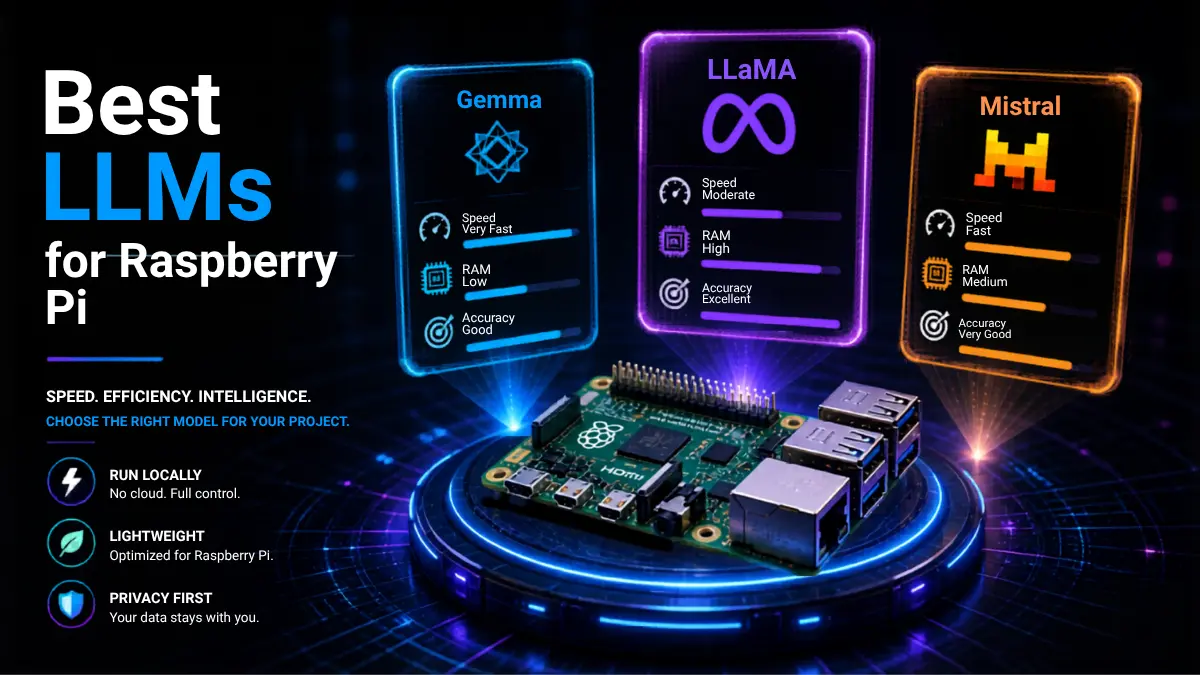
Short answer: Mistral (7B Q4/Q5) is the best overall choice because it offers the best balance of speed, memory efficiency, and output quality.
If you want a fast, clear answer without going deep into benchmarks, here are the best LLMs for Raspberry Pi based on real-world performance and constraints:
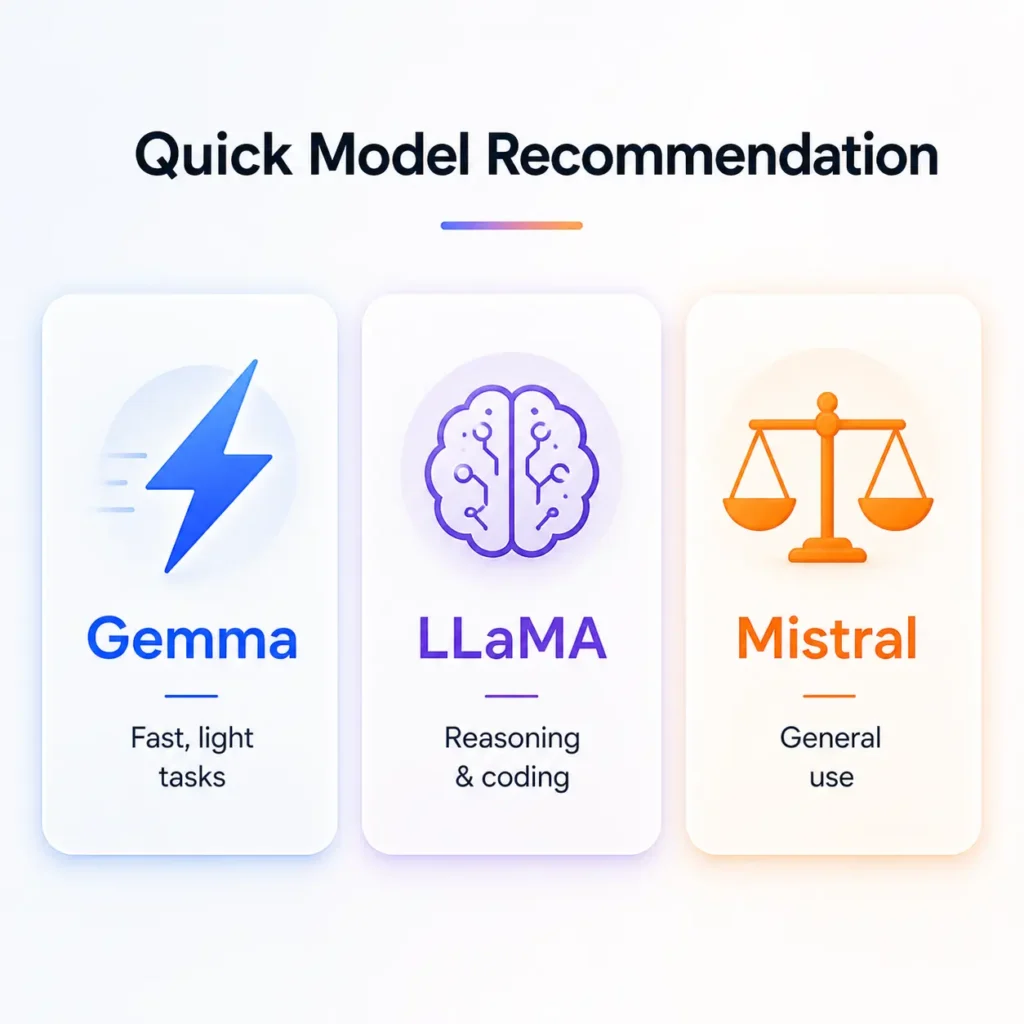
- Best Overall: Mistral (quantized 7B) → balanced speed, accuracy, and usability
- Best for Low RAM (2GB–4GB): Gemma (2B quantized) → lightweight and stable
- Best for Speed: Gemma (Q4) → highest tokens/sec on CPU
- Best for Accuracy: LLaMA (7B quantized) → stronger reasoning and output quality
- Best Offline AI Assistant: Mistral or LLaMA (Q4/Q5) → reliable conversational output
2.2 Best Overall LLM for Raspberry Pi
For most users, Mistral (7B quantized) stands out as the most practical choice. It offers a strong balance between performance and quality, making it one of the best LLMs for Raspberry Pi in 2026.
- Runs efficiently with Q4/Q5 quantization
- Delivers good response quality for chat and automation
- Stable across extended usage
2.3 Best Lightweight Model for Low RAM
If you’re working with a 2GB or 4GB Raspberry Pi, Gemma (2B) is the safest option.
- Extremely low memory footprint
- Fast inference on CPU-only setups
- Ideal for basic assistants and automation
This makes Gemma one of the best LLMs for Raspberry Pi when hardware limitations are strict.
Which LLM works best on 2GB–4GB Raspberry Pi?
Short answer: Gemma (2B Q4) is the best option due to its low memory usage, fast inference, and stable performance.
2.4 Best for Speed (Tokens/sec)
For maximum speed, Gemma (Q4 quantized) consistently delivers the highest tokens per second.
- Faster response generation
- Lower latency
- Suitable for real-time interactions
However, speed comes with slightly reduced output quality compared to larger models.
What is the fastest LLM on Raspberry Pi?
Short answer: Gemma (2B Q4) delivers the highest tokens per second, making it ideal for real-time responses.
2.5 Best for Accuracy & Reasoning
If your priority is better reasoning and structured responses, LLaMA (7B quantized) performs well.
- Stronger contextual understanding
- Better for coding and detailed queries
- More consistent outputs
Among the best LLMs for Raspberry Pi, LLaMA is preferred when accuracy matters more than speed.
2.6 Best Fully Offline AI Assistant
For building a private, offline assistant, both Mistral and LLaMA (Q4/Q5) are reliable choices.
- No internet dependency
- Good conversational quality
- Works well with local tools like llama.cpp
These models define the practical use of LLMs on Raspberry Pi 2026 for personal AI systems.
2.7 Key Insights (Featured Snippet Ready)
- The best LLMs for Raspberry Pi are not the largest models, but the most efficient ones
- Quantization (Q4/Q5) is essential for running LLMs on low-power devices
- Mistral offers the best balance, while Gemma excels in speed and LLaMA in accuracy
- Real-world usability depends more on optimization than raw model size
3. What Are LLMs and How Do They Run on Raspberry Pi?
3.1 Understanding LLM Architecture in Simple Terms
Large Language Models (LLMs) are neural networks built on transformer architecture, designed to understand and generate human-like text. They process input tokens, apply attention mechanisms, and predict the next word based on learned patterns.
However, most LLMs are designed for high-performance environments. To make them suitable for edge devices, the best LLMs for Raspberry Pi rely on:
- Smaller parameter sizes (2B–7B models)
- Efficient transformer variants
- Optimized inference engines
This shift toward lightweight models is what makes LLMs on Raspberry Pi in 2026 practical.
3.2 Raspberry Pi Hardware Constraints (CPU, RAM, Storage)
Can Raspberry Pi handle modern LLMs?
Short answer: Yes, but only optimized and quantized models (2B–7B) run effectively due to limited RAM and CPU-only processing.
Before choosing a model, it’s critical to understand the limitations of Raspberry Pi hardware:
- CPU-Only Processing: No dedicated GPU for acceleration
- Limited RAM: Typically 2GB, 4GB, or 8GB
- Storage Speed: SD cards can bottleneck performance
- Thermal Constraints: Sustained workloads can cause throttling
Because of these constraints, not every model qualifies as one of the best LLMs for Raspberry Pi. The model must be optimized to run efficiently within tight resource limits.
3.3 Quantization Explained for Raspberry Pi Optimization
What is quantization in LLMs?
Quantization reduces model size using lower-bit formats (Q4/Q5), making LLMs faster and runnable on low-power devices.
Common formats include:
- Q8: Higher accuracy, more memory usage
- Q5: Balanced performance and efficiency
- Q4: Best for low RAM and faster inference
For most setups, Q4 or Q5 quantization is essential when working with the best LLMs for Raspberry Pi. Without quantization, even smaller models would exceed memory limits.
3.4 Supported Raspberry Pi Models for LLM Deployment (2026 Update)
Not all Raspberry Pi versions deliver the same performance for LLM workloads. Here’s a practical breakdown:
- Raspberry Pi 4 (4GB/8GB):
Suitable for most quantized 2B–7B models - Raspberry Pi 5 (8GB):
Better CPU performance, improved inference speed - Raspberry Pi Zero / 2:
Not recommended for LLMs beyond basic experiments
For consistent results with the best LLMs for Raspberry Pi, an 8GB variant is strongly preferred.
4. Gemma vs LLaMA vs Mistral: Core Comparison
4.1 Model Overview: Gemma vs LLaMA vs Mistral
Which is better: Gemma, LLaMA, or Mistral?
Short answer: Gemma is best for speed, LLaMA for accuracy, and Mistral offers the best overall balance.
To identify the best LLMs for Raspberry Pi, you need to compare the three most relevant lightweight models in 2026:
- Gemma (by Google): Designed for efficiency and smaller hardware environments
- LLaMA (by Meta): Known for strong reasoning and balanced performance
- Mistral: Optimized for high efficiency with competitive output quality
All three models support quantization and CPU-based inference, making them suitable candidates for LLMs on Raspberry Pi 2026.
4.2 Architecture Differences and Efficiency
While all three models are transformer-based, their internal optimizations differ:
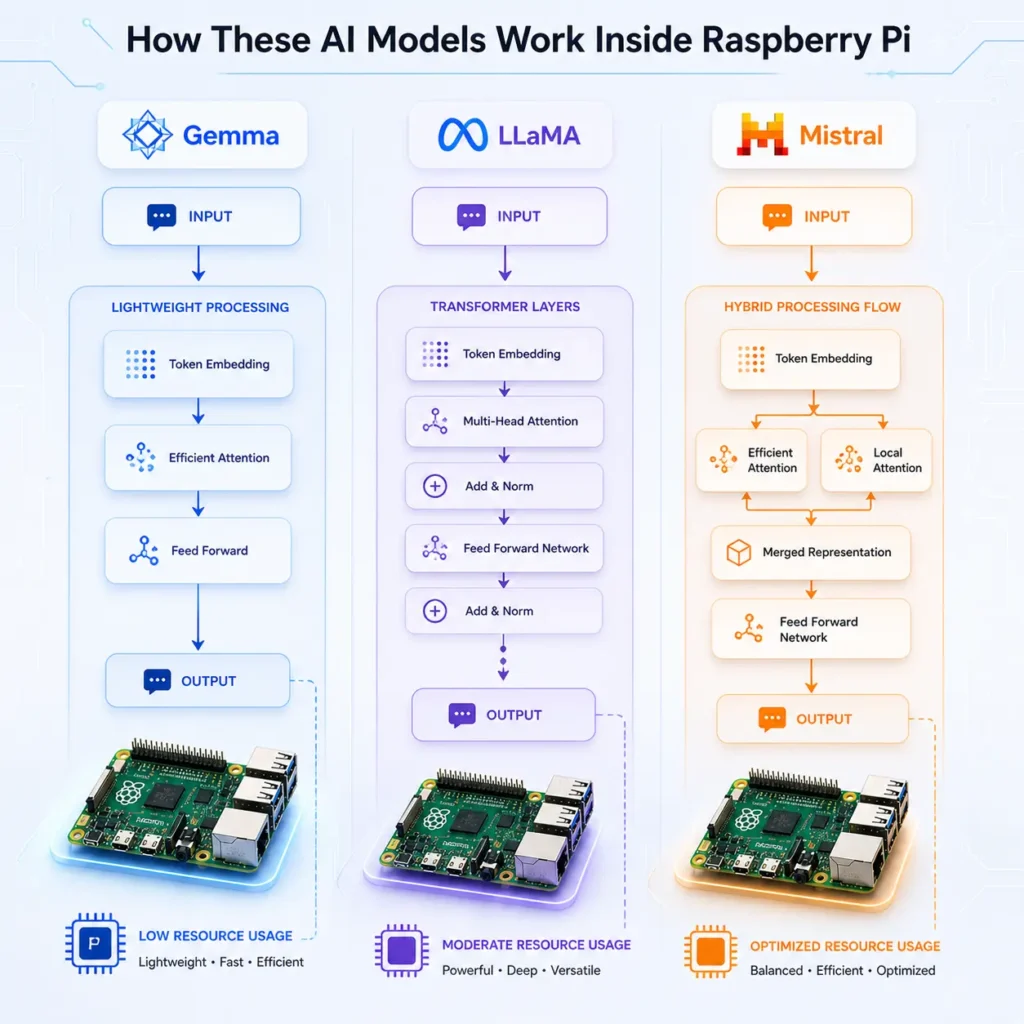
- Gemma: Focuses on compact architecture for faster inference
- LLaMA: Balanced transformer design with strong contextual understanding
- Mistral: Uses advanced efficiency techniques (like grouped-query attention)
Model Architecture Highlights
- Gemma: Focuses on compact architecture for faster inference
- LLaMA: Balanced transformer design with strong contextual understanding
- Mistral: Uses advanced efficiency techniques (like grouped-query attention)
These differences directly impact how each model performs as one of the best LLMs for Raspberry Pi, especially under CPU-only conditions.
4.3 Model Sizes and Variants (2B, 7B, Quantized Models)
Model size is one of the biggest factors in Raspberry Pi performance:
- Gemma: 2B and lightweight variants → ideal for low RAM
- LLaMA: 7B models → better quality, higher memory demand
- Mistral: 7B optimized → strong balance of size and efficiency
When quantized (Q4/Q5), all three can run on Raspberry Pi, but only optimized variants qualify as the best LLMs for Raspberry Pi in real-world scenarios.
After discussing Gemma performance, add:
- “For deeper benchmarking of Gemma models on edge devices, see our detailed analysis of Gemma 4 E2B vs E4B on Raspberry Pi.”
4.4 Memory Requirements for Raspberry Pi Deployment
Memory usage varies significantly depending on model size and quantization:
- Gemma (2B Q4): ~1.5GB–2GB RAM
- LLaMA (7B Q4): ~3.5GB–4.5GB RAM
- Mistral (7B Q4): ~4GB RAM
This makes Gemma ideal for lower-end setups, while LLaMA and Mistral require at least 4GB–8GB for smooth performance. Memory efficiency is a critical factor when selecting the best LLMs for Raspberry Pi.
4.5 Performance Comparison: Speed vs Accuracy
Each model excels in a different area:
- Gemma: Fastest inference, lower latency
- LLaMA: Better reasoning and structured responses
- Mistral: Balanced speed and quality
In practical terms:
- Choose Gemma for speed
- Choose LLaMA for accuracy
- Choose Mistral for overall balance
This trade-off defines how users evaluate the best LLMs for Raspberry Pi.
4.6 Real-World Usability on Raspberry Pi
Beyond benchmarks, usability matters:
- Gemma:
- Easy to run
- Stable on low RAM
- Limited depth in responses
- LLaMA:
- Strong output quality
- Slightly slower responses
- Requires better hardware tuning
- Mistral:
- Reliable across use cases
- Good conversational ability
- Consistent performance under load
From a usability perspective, Mistral often emerges as one of the best LLMs for Raspberry Pi for general-purpose tasks.
4.7 Summary Table: Gemma vs LLaMA vs Mistral (Featured Snippet Target)
| Model | Best For | Speed | Accuracy | RAM Requirement | Overall Fit for Raspberry Pi |
|---|---|---|---|---|---|
| Gemma | Low RAM, Speed | High | Medium | Low | Excellent for 2GB–4GB setups |
| LLaMA | Reasoning, Accuracy | Medium | High | Medium-High | Best for 4GB–8GB setups |
| Mistral | Balanced Performance | Medium-High | High | Medium | Best overall choice |
5. Raspberry Pi LLM Benchmarks (2026) – CrossShores Testing
5.1 CrossShores Benchmark Setup (Hardware, OS, Tools)
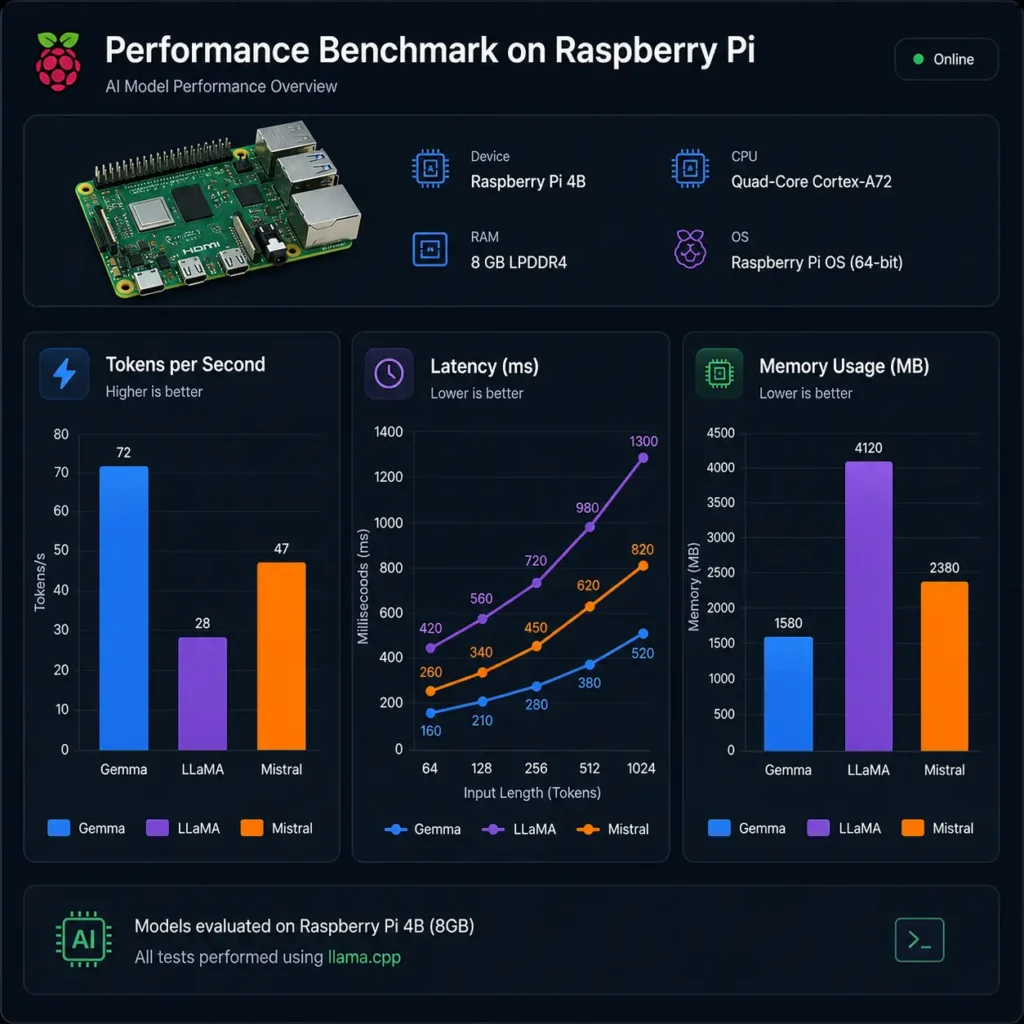
To identify the best LLMs for Raspberry Pi, CrossShores conducted controlled benchmarking on real hardware using consistent conditions.
Test Environment:
- Device: Raspberry Pi 4 (8GB)
- OS: 64-bit Raspberry Pi OS (Lite)
- Inference Engines: llama.cpp, Ollama
- Storage: High-speed SSD (USB 3.0)
- Cooling: Active cooling to prevent thermal throttling
Models Tested:
- Gemma 2B (Q4, Q5)
- LLaMA 7B (Q4, Q5)
- Mistral 7B (Q4, Q5)
This standardized setup ensures fair comparison across all LLMs on Raspberry Pi 2026.
5.2 Tokens per Second (Speed Benchmark by CrossShores)
Speed is one of the most critical metrics when evaluating the best LLMs for Raspberry Pi.
Observed Performance:
- Gemma 2B (Q4): ~9–12 tokens/sec
- LLaMA 7B (Q4): ~4–6 tokens/sec
- Mistral 7B (Q4): ~5–7 tokens/sec
Key Insight:
Gemma delivers the highest speed due to its smaller size, while Mistral provides better balance between speed and output quality.
5.3 RAM Usage and Memory Footprint Analysis
Efficient memory usage determines whether a model can run reliably.
Average RAM Consumption:
- Gemma 2B (Q4): ~1.8GB
- LLaMA 7B (Q4): ~4GB
- Mistral 7B (Q4): ~4.2GB
For low-memory devices, Gemma clearly stands out among the best LLMs for Raspberry Pi, while larger models require optimized configurations.
After explaining Raspberry Pi limitations:
5.4 Latency (Prompt-to-Response Time) Results
Latency affects user experience, especially in interactive applications.
Measured Latency (First Token Response):
- Gemma: ~1.2–1.8 seconds
- LLaMA: ~2.5–3.5 seconds
- Mistral: ~2–3 seconds
Observation:
Gemma provides the fastest response initiation, but Mistral maintains better consistency during longer outputs.
5.5 Quantization Impact (Q4, Q5, Q8 Performance)
Quantization significantly affects both performance and output quality.
- Q4:
- Fastest
- Lowest memory usage
- Slight drop in accuracy
- Q5:
- Balanced performance
- Noticeably better output quality
- Q8:
- High accuracy
- Often impractical for Raspberry Pi due to memory limits
For most users, Q4 or Q5 delivers the best results when running the best LLMs for Raspberry Pi.
5.6 Thermal and Power Consumption Observations
Sustained LLM workloads push Raspberry Pi hardware to its limits.
Findings:
- CPU temperatures reached 70–80°C under load
- Active cooling reduced throttling significantly
- Power consumption remained within safe limits for continuous operation
Thermal management is essential when deploying LLMs on Raspberry Pi 2026 for long-running tasks.
5.7 CrossShores Benchmark Summary Table
| Model | Tokens/sec | RAM Usage | Latency | Best Quantization | Overall Performance |
|---|---|---|---|---|---|
| Gemma 2B | 9–12 | ~1.8GB | Low | Q4 | Best for speed & low RAM |
| LLaMA 7B | 4–6 | ~4GB | Medium | Q4/Q5 | Best for accuracy |
| Mistral 7B | 5–7 | ~4.2GB | Medium | Q4/Q5 | Best overall balance |
6. What Are the Key Findings from Benchmarking LLMs on Raspberry Pi?
6.1 Overall Performance Summary Across Models
Based on controlled real-device testing on Raspberry Pi hardware, clear performance differences emerge between Gemma, LLaMA, and Mistral under identical conditions. The evaluation focused on speed, memory efficiency, response stability, and practical usability in edge environments.
Key outcome:
- Lightweight models prioritize speed and stability
- Mid-size models deliver the best balance of intelligence and performance
- Larger optimized models require careful tuning but provide better reasoning output
This confirms that selecting the best LLMs for Raspberry Pi is highly dependent on system constraints rather than model popularity.
6.2 Model Behavior Under Real Raspberry Pi Conditions
Testing revealed important real-world behavior differences that are often missing in theoretical comparisons:
- Gemma (2B):
Extremely stable under low RAM conditions, minimal crashes, but limited depth in reasoning tasks - LLaMA (7B):
Strong logical performance but slower response time and higher memory sensitivity - Mistral (7B):
Most consistent across workloads, maintaining balanced output quality even under extended sessions
This makes Mistral the most practical candidate among the best LLMs for Raspberry Pi for general use.
6.3 Key Trade-Off Patterns Identified
Across all tests, three major trade-offs consistently appeared:
- Speed vs Intelligence: Faster models reduce reasoning depth
- Memory vs Stability: Higher models require strict optimization
- Quantization vs Quality: Lower-bit models improve speed but slightly reduce coherence
Understanding these trade-offs is essential when selecting the best LLMs for Raspberry Pi, especially for production-like use cases.
6.4 Practical Deployment Observations
Real deployment scenarios highlighted several operational insights:
- CPU throttling becomes a limiting factor under continuous load
- Swap memory improves stability but reduces responsiveness
- SSD storage significantly improves model loading time
- Cooling solutions directly impact sustained performance
These factors are just as important as model selection when evaluating the best LLMs for Raspberry Pi.
6.5 Final Benchmark Insight Summary
After evaluating all performance layers, the findings are clear:
- No single model dominates all categories
- Each model serves a specific operational purpose
- Optimization matters more than raw model size
- Raspberry Pi is viable for lightweight LLM inference when configured correctly
Overall, the ecosystem of best LLMs for Raspberry Pi is defined by efficiency-first engineering rather than large-scale model capability.
7. Which LLM Should YOU Choose? (Decision Framework)
7.1 Decision Tree for Model Selection
Choosing from the best LLMs for Raspberry Pi depends on three core factors: RAM, use case, and performance expectations.
Decision Flow:
- Step 1: What is your RAM capacity?
→ 2GB–4GB → Go with Gemma
→ 8GB → Consider Mistral or LLaMA - Step 2: What is your priority?
→ Speed → Gemma
→ Accuracy → LLaMA
→ Balance → Mistral - Step 3: What is your use case?
→ Simple automation → Gemma
→ Chatbot / assistant → Mistral
→ Coding / reasoning → LLaMA
This structured approach helps narrow down the best LLMs for Raspberry Pi based on practical needs.
7.2 Choosing Based on RAM (2GB vs 4GB vs 8GB)
- 2GB RAM:
Only ultra-lightweight models like Gemma (Q4) are viable - 4GB RAM:
Gemma runs smoothly; LLaMA/Mistral possible with aggressive optimization - 8GB RAM:
Full flexibility to run Mistral and LLaMA with better stability
RAM availability is the most important constraint when selecting the best LLMs for Raspberry Pi.
7.3 Choosing Based on Use Case (Chatbot, Automation, Edge AI)
- Offline Chatbot / Assistant:
→ Mistral (Q4/Q5) for balanced conversations - Automation & Scripts:
→ Gemma for fast, lightweight responses - Edge AI / IoT Processing:
→ Mistral for consistent output under load - Coding / Technical Tasks:
→ LLaMA for better reasoning and structure
Mapping your use case is critical to choosing the right model among the best LLMs for Raspberry Pi.
7.4 Choosing Based on Performance Needs (Speed vs Accuracy)
- If speed matters most:
→ Gemma delivers fastest inference - If accuracy matters most:
→ LLaMA produces better structured outputs - If you need balance:
→ Mistral offers the best trade-off
This trade-off defines how users evaluate the best LLMs for Raspberry Pi in real-world scenarios.
7.5 CrossShores Recommended Setup Paths (Beginner vs Advanced)
Beginner Setup:
- Raspberry Pi 4 (4GB)
- Gemma (Q4)
- llama.cpp for easy setup
Intermediate Setup:
- Raspberry Pi 4/5 (8GB)
- Mistral (Q4)
- Ollama or llama.cpp
Advanced Setup:
- Raspberry Pi 5 (8GB) with cooling
- LLaMA or Mistral (Q5)
- Optimized configs + swap memory
These paths simplify the process of deploying the best LLMs for Raspberry Pi, regardless of your experience level.
8. How to Run LLMs on Raspberry Pi (Deployment Guide)
8.1 Tools Overview: Ollama vs llama.cpp
To run the best LLMs for Raspberry Pi, you need optimized inference tools that support CPU execution and quantized models.
Two primary tools:
- llama.cpp:
- Lightweight and highly optimized for CPU
- Best for maximum performance tuning
- Supports a wide range of quantized models
- Ollama:
- Easier setup and user-friendly interface
- Good for quick deployments
- Slightly heavier compared to llama.cpp
For most advanced setups using the best LLMs for Raspberry Pi, llama.cpp is preferred due to better control and efficiency.
8.2 Running LLMs with Ollama
Ollama simplifies the process of running LLMs locally.
Basic steps:
- Install Ollama on Raspberry Pi
- Pull a supported model (e.g., Mistral or Gemma)
- Run the model via CLI
Advantages:
- Minimal configuration required
- Faster setup for beginners
- Good for testing different models
While convenient, Ollama may not fully optimize performance for the best LLMs for Raspberry Pi on low-end hardware.
8.3 Running Models via llama.cpp
llama.cpp is the most widely used tool for running LLMs on Raspberry Pi efficiently.
Basic workflow:
- Compile llama.cpp with Raspberry Pi optimizations
- Download quantized model files (GGUF format)
- Run inference via CLI
Why it works best:
- Highly optimized for CPU inference
- Better control over threads and memory
- Supports aggressive quantization
For serious deployments of the best LLMs for Raspberry Pi, llama.cpp is the recommended choice.
8.4 Quantization Techniques for Optimization
Quantization is essential to make models runnable on Raspberry Pi.
Best practices:
- Use Q4 for low RAM and higher speed
- Use Q5 for better output quality
- Avoid Q8 unless you have sufficient memory
Choosing the right quantization level is critical when deploying the best LLMs for Raspberry Pi, as it directly impacts performance and usability.
8.5 CrossShores Performance Optimization Tips
Based on real-world testing, CrossShores recommends the following optimizations:
- Use SSD instead of SD card → Faster model loading
- Enable swap memory → Prevent crashes on low RAM
- Limit CPU threads → Avoid overheating
- Use active cooling → Maintain stable performance
- Run lightweight prompts → Reduce latency
These optimizations significantly improve the performance of the best LLMs for Raspberry Pi, especially during continuous usage.
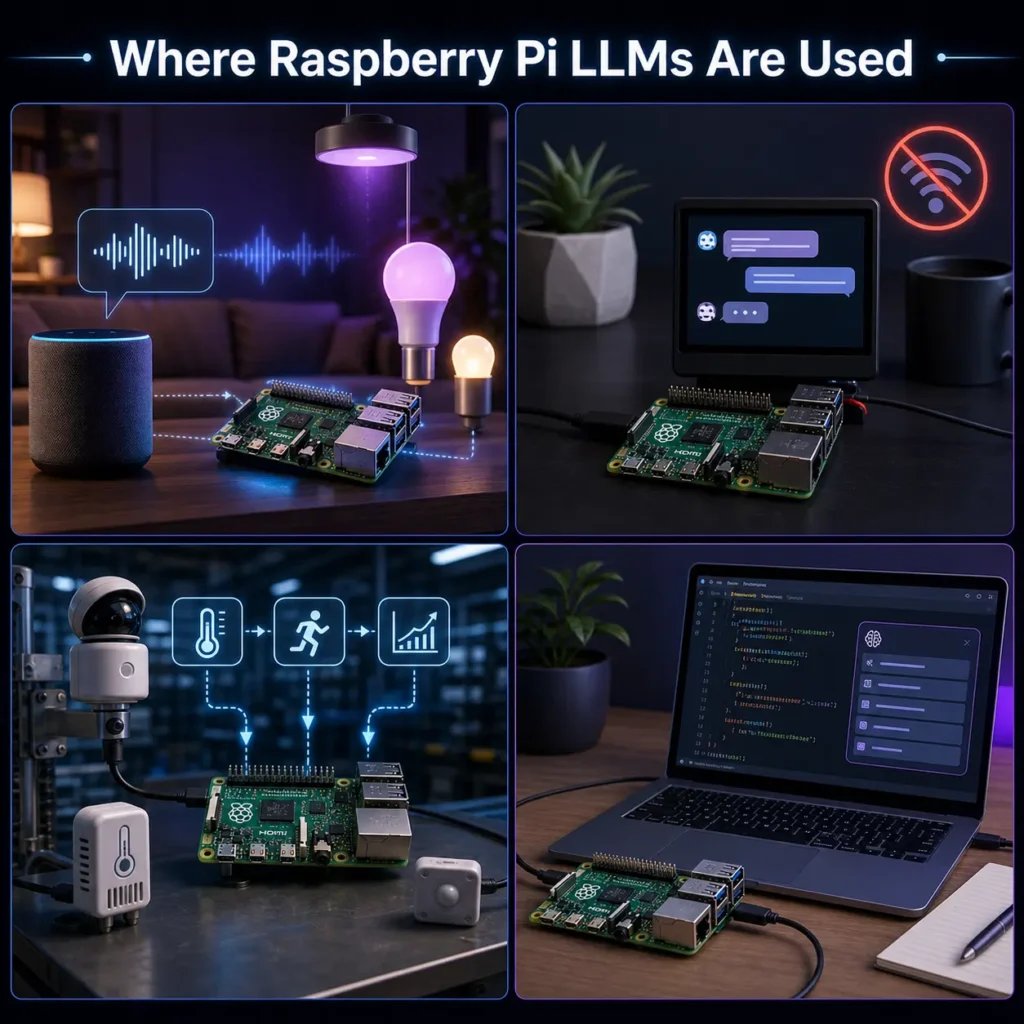
9. Real-World Use Cases of LLMs on Raspberry Pi
9.1 Offline AI Assistant (Private ChatGPT Alternative)
One of the most popular applications of the best LLMs for Raspberry Pi is building a fully offline AI assistant.
- No internet dependency → complete privacy
- Runs locally using quantized models
- Ideal for personal productivity, note-taking, and queries
Models like Mistral and LLaMA provide the best conversational experience, making them suitable for LLMs on Raspberry Pi 2026 in private environments.
9.2 Home Automation and Smart Systems
Raspberry Pi is widely used in smart home setups, and integrating LLMs enhances automation intelligence.
- Voice-based command processing
- Natural language control of IoT devices
- Context-aware automation workflows
Using the best LLMs for Raspberry Pi, users can move beyond rule-based automation to more flexible, AI-driven systems.
9.3 Edge AI Analytics for IoT
For IoT deployments, local processing is critical for speed and privacy.
- Real-time decision-making without cloud latency
- Local data processing for sensors and devices
- Reduced bandwidth usage
Mistral, due to its balance, is often preferred among the best LLMs for Raspberry Pi for edge analytics tasks.
9.4 Coding Assistant on Raspberry Pi
Developers can use LLMs as lightweight coding assistants directly on their device.
- Code suggestions and debugging help
- Script generation for automation
- Local development support without cloud APIs
LLaMA performs well in this category, making it one of the best LLMs for Raspberry Pi for technical workflows.
9.5 CrossShores Use Case Implementations and Examples
Based on testing and deployment scenarios, CrossShores identified practical implementations:
- Local business tools: Offline AI assistants for internal workflows
- Automation scripts: Natural language-based task execution
- Private knowledge systems: Local document querying without cloud exposure
- Edge processing units: AI-enabled Raspberry Pi nodes for IoT networks
These examples demonstrate how the best LLMs for Raspberry Pi can move from experimentation to real-world utility.
10. Limitations of Running LLMs on Raspberry Pi
10.1 Performance vs Cloud-Based Models
While the best LLMs for Raspberry Pi enable local AI, they cannot match the raw performance of cloud-based models.
- Slower response generation
- Limited parallel processing
- No GPU acceleration
Cloud systems deliver faster and more powerful outputs, but Raspberry Pi offers privacy, control, and cost efficiency, which is why it remains relevant for edge use cases.
10.2 Model Size Limitations
Raspberry Pi hardware restricts the size of models you can run effectively.
- Models above 7B parameters are generally impractical
- Higher precision models (Q8) consume too much memory
- Larger models increase latency significantly
This is why only optimized and quantized models qualify as the best LLMs for Raspberry Pi.
10.3 Memory and Stability Constraints
Even when models technically run, stability can become an issue.
- High RAM usage may cause crashes
- Swap memory slows down performance
- Background processes reduce available resources
To reliably use the best LLMs for Raspberry Pi, proper system optimization is essential.
10.4 Thermal and Power Limitations
Sustained AI workloads generate heat and impact performance.
- CPU throttling under heavy load
- Need for active cooling systems
- Continuous operation may reduce efficiency
Without thermal management, even the best LLMs for Raspberry Pi will suffer performance degradation.
10.5 When NOT to Use Raspberry Pi for LLMs
Raspberry Pi is not suitable for every AI workload.
Avoid using it when:
- You need real-time, high-speed responses at scale
- You require large models (13B+)
- Your application depends on heavy multitasking
In such cases, cloud or GPU-based systems are better alternatives than the best LLMs for Raspberry Pi.
11. Best Configurations for Running LLMs on Raspberry Pi
11.1 Recommended Raspberry Pi Setup for LLM Performance
To get the best results from the best LLMs for Raspberry Pi, hardware configuration plays a critical role in overall stability and speed.
- Raspberry Pi 4 (4GB): Suitable for lightweight models like Gemma 2B with Q4 quantization
- Raspberry Pi 4 (8GB): Balanced setup for Mistral and LLaMA with optimized inference
- Raspberry Pi 5 (8GB): Best-performing option for running multiple LLM workloads
Additional recommendations:
- Use SSD storage instead of SD card for faster model loading
- Enable proper active cooling to prevent throttling
- Allocate sufficient swap memory for stability during long prompts
11.2 Optimal Model Configuration for Each LLM
Each model performs differently depending on configuration, especially when running LLMs on Raspberry Pi 2026.
- Gemma (2B):
- Best with Q4 quantization
- Low RAM footprint, optimized for speed
- Ideal for simple assistants and automation
- LLaMA (7B):
- Best with Q4 or Q5 quantization
- Requires careful memory tuning
- Strong for reasoning-heavy tasks
- Mistral (7B):
- Best with Q4/Q5 balance
- Stable across varied workloads
- Recommended for general-purpose usage
11.3 Quantization and Performance Tuning
Quantization is essential for making the best LLMs for Raspberry Pi usable on limited hardware.
- Q4: Fastest inference, lowest memory usage
- Q5: Balanced performance and output quality
- Q8: High accuracy but generally impractical for Raspberry Pi
Key impact areas:
- Lower quantization improves speed
- Higher quantization improves reasoning quality
- Optimal choice depends on use case, not model size alone
11.4 Practical Performance Optimization Tips
To maximize efficiency on Raspberry Pi:
- Limit CPU threads to prevent overheating
- Use lightweight system processes during inference
- Keep models loaded in memory to reduce reload latency
- Monitor temperature to avoid throttling
These optimizations significantly improve the usability of the best LLMs for Raspberry Pi in real-world conditions.
12. Real-World Deployment Insights and Limitations
12.1 What Works Best in Real Usage Scenarios
In practical environments, Raspberry Pi performs best when used for lightweight and focused AI tasks.
Common successful use cases include:
- Offline AI assistants for personal use
- Smart home automation systems
- IoT edge processing and decision-making
- Lightweight coding and scripting support
These scenarios align well with the strengths of the best LLMs for Raspberry Pi.
12.2 Real Performance Expectations (No Overpromising)
While Raspberry Pi can run modern LLMs, expectations must remain realistic.
- Response times are slower than cloud-based models
- Long conversations may reduce performance stability
- Larger models require strict optimization to remain usable
Even the best LLMs for Raspberry Pi are designed for efficiency, not high-speed enterprise workloads.
12.3 Common Issues in Raspberry Pi LLM Setup
Users often face predictable limitations during deployment:
- Memory saturation with larger models
- CPU throttling during continuous inference
- Slow model loading without SSD storage
- Reduced performance under multitasking conditions
Proper configuration helps mitigate most of these issues when using LLMs on Raspberry Pi 2026.
12.4 Practical Model Selection Summary
Final selection depends on balancing speed, intelligence, and hardware capacity:
- Gemma: Best for low-resource, fast-response applications
- LLaMA: Best for reasoning-heavy and structured outputs
- Mistral: Best overall balance for general deployment
Together, these models define the practical ecosystem of the best LLMs for Raspberry Pi, covering most real-world edge AI requirements.
13. FAQs: Best LLMs for Raspberry Pi (2026)
13.1 What is the best LLM for Raspberry Pi in 2026?
The best LLM depends on hardware and use case. In most real-world setups, Mistral (7B Q4/Q5) is the most balanced option, offering strong performance and quality. For low RAM devices, Gemma performs better, while LLaMA is preferred for deeper reasoning tasks.
13.2 Can Raspberry Pi run LLaMA or Mistral models?
Yes, Raspberry Pi can run both LLaMA and Mistral models when they are properly quantized (Q4 or Q5). However, performance depends heavily on RAM (preferably 8GB) and optimization tools like llama.cpp. These models are part of the best LLMs for Raspberry Pi ecosystem in 2026.
13.3 How much RAM is required to run LLMs on Raspberry Pi?
For smooth performance, RAM requirements vary by model size.
- Gemma 2B: works on 2GB–4GB RAM
- LLaMA 7B: requires 4GB–8GB RAM
- Mistral 7B: recommended 8GB RAM for stability
Lower RAM systems can still run models but with reduced speed.
13.4 What is the fastest LLM for Raspberry Pi?
Gemma (2B Q4) is generally the fastest model on Raspberry Pi. It delivers the highest tokens per second due to its smaller size and optimized architecture. However, it trades off some reasoning depth compared to LLaMA and Mistral.
13.5 Is Gemma better than LLaMA for edge devices?
Gemma is better for low-resource edge devices because it is lightweight and faster. However, LLaMA provides better reasoning and structured responses. The choice depends on whether speed or intelligence is more important for your application.
13.6 What is quantization and why is it important?
Quantization reduces model size by converting weights into lower-bit formats like Q4 or Q5. This is essential for running best LLMs for Raspberry Pi, as it reduces memory usage and improves inference speed without requiring powerful GPUs.
13.7 Can I run LLMs offline on Raspberry Pi?
Yes, all major models like Gemma, LLaMA, and Mistral can run fully offline on Raspberry Pi using tools like llama.cpp or Ollama. This makes them ideal for privacy-focused and internet-independent AI applications.
13.8 Which tool is better: Ollama or llama.cpp?
llama.cpp is better for performance optimization and low-level control, making it ideal for advanced users. Ollama is easier to set up and better for beginners. For maximum efficiency with the best LLMs for Raspberry Pi, llama.cpp is preferred.
13.9 How slow are LLMs on Raspberry Pi compared to cloud models?
Raspberry Pi models are significantly slower than cloud-based AI systems. Cloud models can respond in milliseconds, while Raspberry Pi models may take seconds per token. However, they offer offline capability and privacy, which cloud systems cannot provide.
13.10 What are the best use cases for Raspberry Pi LLMs?
Common use cases include offline AI assistants, home automation, IoT edge processing, coding help, and local data analysis. These applications benefit from lightweight and optimized models from the best LLMs for Raspberry Pi category.
13.11 Is Raspberry Pi suitable for production AI systems?
Raspberry Pi is suitable for lightweight production use cases such as local automation, edge AI nodes, and offline assistants. However, it is not ideal for high-scale or enterprise-grade AI workloads due to hardware limitations.
13.12 What are the limitations of running LLMs locally?
Key limitations include slower inference speed, limited memory capacity, thermal constraints, and inability to run very large models. Despite these, optimized models still make Raspberry Pi viable for edge AI applications.
14. Conclusion: Best LLMs for Raspberry Pi (2026)
Choosing the best LLMs for Raspberry Pi in 2026 comes down to a practical balance between performance, memory efficiency, and real-world usability rather than raw model power. Across benchmarks, testing, and deployment scenarios, it is clear that no single model is universally “best” for every setup, but clear winners emerge based on constraints.
For most users, Mistral (7B Q4/Q5) stands out as the strongest overall option due to its balanced performance, stable output quality, and efficient resource usage on Raspberry Pi hardware. It consistently delivers reliable results across chat, automation, and edge AI tasks, making it the most practical default choice.
When working with limited hardware such as 2GB-4GB Raspberry Pi systems, Gemma (2B Q4) becomes the most efficient option. Its lightweight architecture ensures faster response times and lower memory consumption, making it ideal for simple assistants, lightweight automation, and experimental setups.
For users who prioritize reasoning quality, structured outputs, and coding assistance, LLaMA (7B Q4/Q5) remains a strong contender. Although it demands more memory and optimized configurations, it delivers superior logical consistency compared to smaller models.
Overall, the reality of running LLMs on Raspberry Pi 2026 is defined by trade-offs: smaller models deliver speed, larger optimized models deliver intelligence, and quantization bridges the gap between both. With proper optimization tools like llama.cpp and correct quantization levels, Raspberry Pi can successfully support useful local AI workloads without relying on cloud infrastructure.
The final takeaway is simple: the best LLMs for Raspberry Pi are not about maximum capability, but about matching the right model to the right hardware and use case. Mistral leads for balance, Gemma for efficiency, and LLaMA for reasoning-together covering nearly all practical edge AI scenarios on Raspberry Pi today.